It starts
with zero
and one.
How two symbols become numbers, signals, and everything on your screen.
↓Based on notes from Mr. Doig’s class.
Read a little. Change something. See what happens.
A place for every digit.
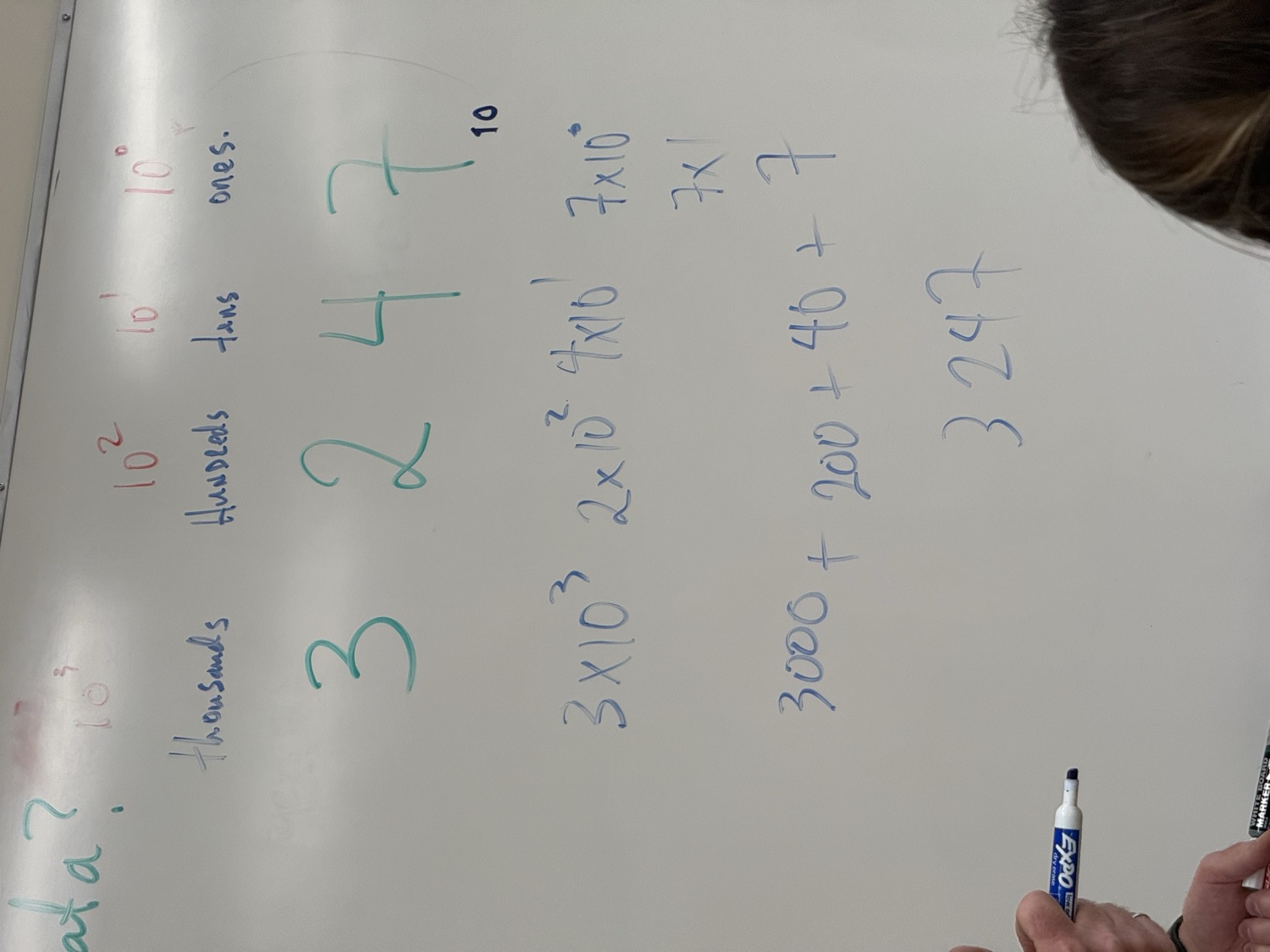
You already think in a number system: base ten. It uses ten digits, 0 through 9. A digit’s value depends on where you put it.
Take 3,247, the example from the whiteboard. The 3 means three thousands; the 7 means seven ones. Each move to the left makes a place worth ten times as much.
The exponent counts positions from the right, starting at zero. 10⁰ = 1.
Think in binary.
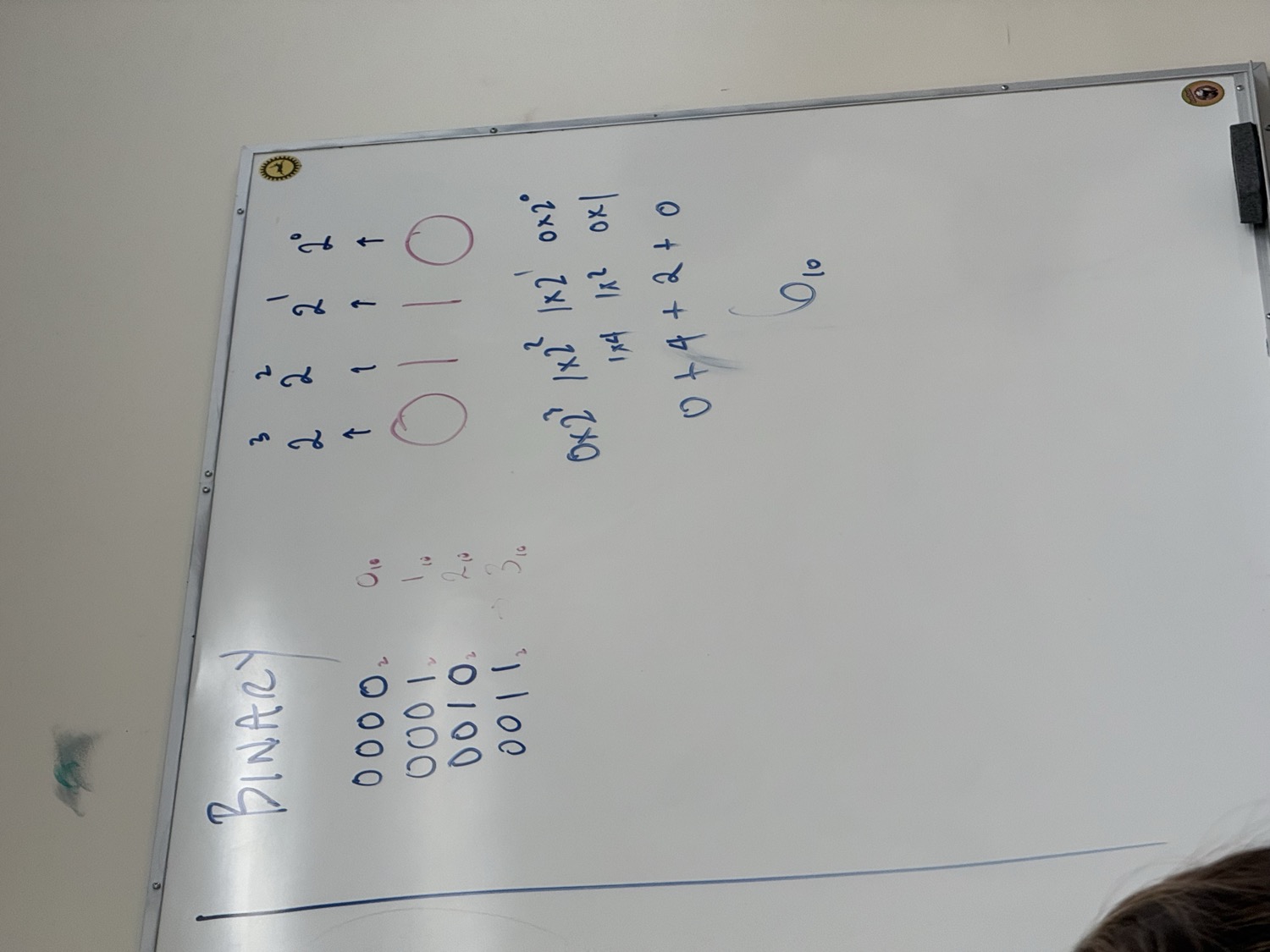
Binary uses just 0 and 1. Its places are powers of two: 1, 2, 4, 8. A 1 includes that place’s value. A 0 leaves it out.
Here is the other whiteboard example: 0110₂ = 6₁₀. The little subscripts tell you the base. Flip a bit to see the same rule at work.
4 + 2
Zero eights, one four, one two, zero ones.
Can you make 9?
Use the switches above, then check your number.
Count from 7 to 8: 0111 → 1000. Just like 9 becoming 10 in base ten, a full place resets and carries left. Four bits give 16 patterns, representing 0 through 15.
Make it physical.
A computer needs a physical way to distinguish two states. Transistors are tiny devices that can act as electrically controlled switches. They are made using semiconductors such as silicon.
For a simple model, think of a lamp circuit. An open switch breaks the path. A closed switch completes it. We can agree to call off 0 and on 1.
Open switch · lamp off
This models two distinguishable states. Real digital circuits use voltage ranges; a transistor being on does not always make the circuit’s output 1.
A material that gave a valley its name.
Silicon’s electrical properties can be controlled, making it useful for chips. The semiconductor industry around California’s Santa Clara Valley gave Silicon Valley its name. The 14 is silicon’s atomic number: 14 protons.
A little bit bigger.
One binary digit is a bit. Eight bits make a byte. Those eight positions give 2⁸ = 256 different patterns, enough to represent unsigned whole numbers from 0 to 255.
8 bits = 1 byte. This byte represents the unsigned number 6.
Each prefix step multiplies by 1,000. Uppercase B means bytes; lowercase b commonly means bits.
Each column is 1 GB. Each square is 1 billion bits.
3 GB = 3,000,000,000 bytes = 24,000,000,000 bits.
Send a signal.
Wi-Fi carries information using radio waves. Frequency tells us how often a wave repeats: one hertz means one complete cycle per second. At 60 Hz, a wave completes 60 cycles every second.
Change the frequency below. The time window stays the same, so more cycles fit into it.
3 complete cycles in one second. Each cycle takes about 0.333 seconds.
2.4 GHz means 2.4 billion cycles per second. It does not automatically mean 2.4 billion bits per second. Data rate also depends on bandwidth, encoding, and signal conditions.
A repeating wave alone does not tell a chosen message. Modulation changes a wave property to carry data. Here, each bit selects one of two opposite phases. When the bit changes, the signal has to transition between them.
Message: 0110. Each time slot uses a phase chosen for that bit.
This is a teaching model of binary phase modulation, not a recording of Wi-Fi. The shaped view smooths the symbol transitions before applying them to the carrier; it illustrates pulse shaping without simulating a particular radio filter. A real receiver needs timing and a phase reference. The receiver display above replays your chosen bits rather than decoding the drawing.
Give the bits meaning.
A movie might arrive as 24 billion bits. But its size does not tell the computer how to play it. Software follows agreed rules to interpret the data.
Try reading this byte in three different ways. Changing the interpretation keeps the bits the same. Then flip a bit or move the slider to explore a different byte.
- Encoding
- Rules for representing information. ASCII assigns the value 65 to the letter A.
- File format
- Rules for organizing a file. A movie format describes how video, audio, and other information fit together.
- Programming language
- A way to express instructions. Programs written in languages such as Python or Java can interpret and process data.
Put it to work.
Storage keeps the saved file. RAM holds data currently in use. The CPU and GPU process it. Software coordinates the work that produces pictures and sound.
The saved movie is on storage. Playback uses working memory.
RAM is working memory that normally loses its contents without power. ROM and firmware memory have a different role, keeping instructions that help hardware start or operate. Your saved documents normally go to an SSD or hard drive.
Check your thinking.
Five short questions. Try an answer, read the explanation, and keep going. These practice checks were added to help you revisit the lesson.
Keep the original thinking.
Class 1 was taught by Mr. Doig on September 15, 2026. This resource develops Bradley’s notes and two whiteboard photographs into a lesson you can explore.
The interactive activities and practice quiz are teaching additions, not a record of activities or student responses observed in class.
The two whiteboard examples